


How CRM Workflow Automation Helps Businesses Scale Without Adding More Manual Work
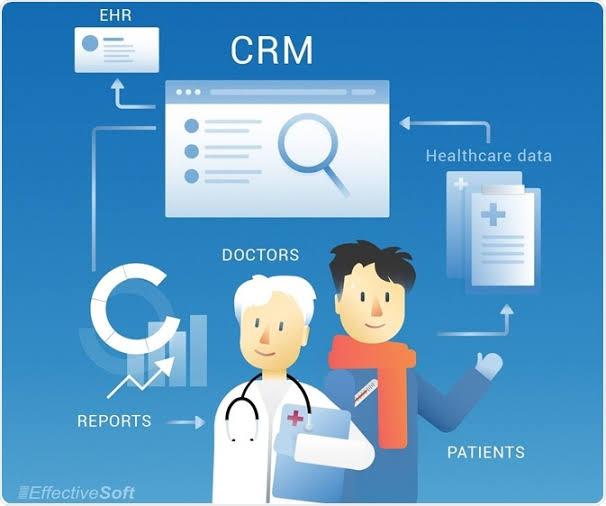
As businesses grow, customer management becomes more complicated. More leads enter the pipeline, sales teams handle larger account lists, customer service receives more requests, and marketing has more campaigns to coordinate. Without the right systems, this growth can create a surprising amount of repetitive work. CRM workflow automation gives businesses a practical way to manage these increasing demands while allowing employees to focus on work that requires human judgment.
A well-designed automated CRM process can handle routine activities such as assigning leads, updating customer records, creating follow-up tasks, sending internal notifications, and moving opportunities between pipeline stages. Instead of asking employees to remember every small step, businesses can create workflows that keep processes moving consistently.
Why Growth Often Creates More Manual Work
Small teams can sometimes manage customer information manually because they have relatively few accounts and simple processes. As the customer base expands, however, the same approach becomes difficult to maintain.
Consider a growing sales team. Every new lead may need to be entered into the CRM, assigned to the appropriate representative, categorized, followed up with, and monitored until a decision is made. If each step depends on an employee remembering what to do next, delays become more likely.
The problem is not necessarily a lack of effort. Employees may simply be spending too much time on administrative activities.
Automation helps shift repetitive responsibilities from people to systems.
What CRM Workflow Automation Actually Does
At its core, workflow automation connects a trigger with a predefined action.
For example, a business could create a workflow that works like this:
New lead arrives → Lead is assigned → Sales task is created → Representative receives notification → Follow-up deadline is scheduled
The workflow can continue with additional conditions depending on what happens next.
This is one reason businesses increasingly look at a workflow automation CRM approach rather than treating the CRM as nothing more than a database.
The CRM becomes an active system that helps coordinate customer-related activities across departments.
1. Automate Lead Assignment
Lead management is one of the easiest places to introduce automation.
When a new inquiry arrives, the CRM can automatically determine who should handle it based on factors such as:
-
Location
-
Product interest
-
Customer type
-
Lead source
-
Company size
-
Existing account ownership
-
Sales territory
Instead of someone manually reviewing every new inquiry, the system can route the lead according to predefined rules.
This can help reduce delays and make lead distribution more consistent.
Why This Matters
Speed is particularly important when a prospect expects a quick response. An automated assignment process allows sales representatives to see new opportunities sooner and begin working on them without waiting for administrative intervention.
2. Keep Customer Records Updated
CRM data can become outdated surprisingly quickly.
A customer changes companies. A contact changes job titles. An opportunity moves into a new stage. A sales representative completes a call but forgets to update the record.
Small gaps can eventually create significant data-quality problems.
A CRM with workflow automation can automatically update certain fields when predefined conditions are met.
For example, when an opportunity is marked as closed-won, the CRM could automatically:
-
Update the customer status
-
Create an onboarding task
-
Notify the customer success team
-
Record the appropriate date
-
Trigger a follow-up process
This reduces the amount of information employees need to update manually.
3. Create Consistent Follow-Up Processes
Following up with prospects is essential, but it can also be repetitive.
A salesperson may need to remember when to send an email, make another call, review a proposal, or check whether a prospect has responded.
Automated workflows can create these tasks automatically based on the stage of the sales process.
For example:
Proposal sent → Wait several days → Create follow-up task → Notify representative
The employee still decides how to communicate with the customer. Automation simply ensures that the next step does not disappear from the workflow.
4. Connect CRM Data With Other Business Systems
Businesses rarely operate with one software platform.
A CRM may need to exchange information with email platforms, accounting software, marketing tools, customer support applications, ecommerce systems, analytics platforms, or internal databases.
This is where CRM integration services become particularly valuable.
Instead of keeping information isolated in different systems, integration can help relevant data move between applications.
For example, when a new customer is created in the CRM, an integrated workflow might send relevant information to another business application so the appropriate team can begin its process.
The goal is not simply to connect software. It is to create a smoother flow of information.
5. Reduce Repetitive Internal Notifications
Employees do not need another notification for everything.
However, certain events genuinely require attention.
A CRM workflow can notify the right person when:
-
A high-value opportunity enters a new stage
-
A lead remains untouched for too long
-
A customer submits an important request
-
A contract approaches renewal
-
An account requires additional attention
-
A sales opportunity becomes inactive
This approach is more useful than sending broad notifications to everyone.
The right automation sends relevant information to the right person at the right time.
6. Make Customer Handoffs Easier
Customer relationships often move between departments.
Marketing may generate the lead. Sales may qualify it. Account management may take over after the deal closes. Customer support may then become responsible for ongoing service.
Without a structured process, important information can get lost during these transitions.
Automation can create standardized handoff workflows.
When an opportunity reaches a specific stage, the CRM can automatically create tasks, update fields, notify another team, and make relevant customer information available to the next department.
This creates a more predictable experience for both employees and customers.
7. Use AI to Support Smarter Automation
Automation becomes even more useful when combined with artificial intelligence.
Modern AI-enabled CRM systems can help teams analyze customer information, identify patterns, summarize interactions, prioritize opportunities, and support decision-making.
Businesses exploring AI CRM integration services can connect AI capabilities with existing customer-management processes instead of treating AI as a separate tool.
For example, AI could help identify which opportunities deserve additional attention while automated workflows handle the resulting administrative tasks.
This combination can create a more responsive sales environment.
How AI Sales Automation Can Support Revenue Growth
Businesses often ask how ai sales automation tools help small businesses increase revenue.
The answer is not simply that AI sells products automatically.
The bigger opportunity is improving how sales teams spend their time.
AI-assisted systems can help identify promising leads, summarize customer interactions, highlight potential follow-up opportunities, and reduce repetitive data-entry responsibilities. Sales professionals can then spend more time on conversations, relationship building, and closing opportunities.
8. Support Microsoft Dynamics Environments
Businesses using Microsoft platforms may have particularly complex CRM requirements.
Microsoft Dynamics CRM integration services can help organizations connect Dynamics environments with other business applications and automated processes.
For example, a company might need customer information from Dynamics to interact with another platform used by finance, customer service, marketing, or operations.
A properly designed integration can reduce duplicate data entry and help employees work with more consistent information.
For organizations with multiple applications, this can become an important part of their overall automation strategy.
9. Build Better Processes Before Automating Them
One common mistake is automating a process simply because it exists.
Automation does not automatically make a poor process better.
Before creating a workflow, businesses should ask:
-
What problem are we trying to solve?
-
Which steps are repetitive?
-
Where do delays usually happen?
-
Who owns each stage?
-
What information is required?
-
What should happen when an exception occurs?
-
How will success be measured?
These questions help identify automation opportunities that have a real business purpose.
10. Combine Automation With Professional Implementation
Complex CRM environments often require more than turning on individual automation features.
Businesses may need to redesign processes, connect multiple applications, migrate data, configure permissions, test workflows, and train employees.
This is where CRM integration and implementation services can support a broader technology strategy.
The objective should be to create an environment where automation supports employees rather than making their work more complicated.
Good implementation considers the entire customer journey instead of automating isolated tasks without understanding how they affect other departments.
Measuring the Value of CRM Automation
Businesses should measure automation based on business outcomes rather than the number of workflows created.
Useful metrics can include:
-
Lead response time
-
Sales cycle length
-
Follow-up completion rate
-
Data-entry time
-
CRM data accuracy
-
Conversion rates
-
Customer response time
-
Employee productivity
-
Number of overdue tasks
-
Revenue generated per sales representative
These measurements can show whether automation is actually improving operations.
For example, if a company automates lead assignment but response times do not improve, it may need to examine what happens after the lead is assigned.
Automation should therefore be treated as an ongoing improvement process.
Creating a Scalable CRM Environment
The biggest benefit of automation may be its ability to support growth without requiring every administrative process to grow at the same rate.
A company with 500 customers may manage certain tasks manually. A company with 5,000 customers may struggle to maintain the same approach. Automated workflows provide a way to standardize repeatable activities while allowing employees to focus on more valuable responsibilities.
However, scalability requires thoughtful design.
Businesses should document important processes, establish clear ownership, review automation regularly, and remove workflows that no longer provide value.
As organizations grow, their CRM strategy should evolve with them.
Conclusion
Business growth should create more opportunities, not simply more administrative work. CRM workflow automation can help companies manage increasing customer activity by automating repetitive tasks, improving information flow, supporting employee productivity, and creating more consistent processes.
From automated lead assignment and follow-ups to CRM integrations, AI-supported processes, and Microsoft Dynamics environments, automation can become an important part of a modern customer-management strategy. Businesses that approach automation strategically can build systems that are easier to manage today and better prepared for tomorrow. Organizations looking to strengthen their CRM ecosystem can work with Soft-korner to develop practical automation and integration solutions aligned with their operational needs.
FAQs
1. What is CRM workflow automation?
CRM workflow automation uses predefined rules and triggers to automatically perform repetitive customer-management activities, such as assigning leads, creating tasks, updating records, and sending notifications.
2. Can CRM automation help small businesses?
Yes. Small businesses can use automation to reduce repetitive administrative work, improve follow-up consistency, organize customer information, and allow employees to spend more time on revenue-generating activities.
3. Is CRM workflow automation useful for sales teams?
Yes. Sales teams can automate lead assignment, follow-up reminders, pipeline updates, task creation, and notifications while retaining human control over customer conversations and important decisions.
4. Can CRM automation connect with other software?
Yes. CRM platforms can often be integrated with marketing, accounting, customer service, ecommerce, communication, analytics, and other business systems. The exact options depend on the CRM and applications involved.
5. How should a business start with CRM automation?
Start by identifying repetitive processes that cause delays or require frequent manual data entry. Prioritize workflows with clear business value, define the desired outcome, test the automation, and measure its results before expanding to additional processes.

 English
 French
 Spanish
 Portuguese
 Deutsch
 Turkish
 Dutch
Dutch
 Italiano
 Russian
 Romaian
 Portuguese (Brazil)
 Greek
Greek